Using Codex/Copilot on a Restricted Intranet Server
Using Codex or Copilot on a domestic intranet server can be a major headache. Due to network blocks and restrictions, it is virtually impossible to smoothly use overseas AI programming tools. Typical symptoms include being unable to log into Codex (or finding it completely unresponsive even if you manage a forced login), and Copilot failing to access the Claude series of models.
This post introduces an elegant solution to bypass these network restrictions. This guide assumes your environment is connected to the server via VS Code Remote-SSH.
Step 1: Configure SSH Remote Port Forwarding
First, you need to configure the proxy on your local machine and verify its listening port. Taking V2rayN as an example, the default listening port is usually 10808.

Locate the SSH config file for your target server and add the following line:
RemoteForward 10808 127.0.0.1:10808
This configuration opens a listening port (10808) on the remote server. It will capture all traffic sent to that remote port and forward it securely back to your local machine.
Step 2: Configure the Proxy in VS Code
Next, adjust your VS Code settings to use this local proxy.
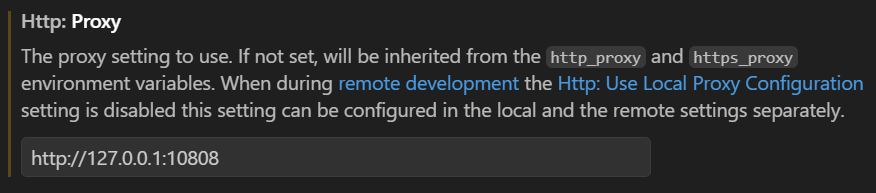
Once this configuration is complete, Codex and Copilot will be fully functional and ready to use!
Was this helpful?